Błąd przy logowaniu w Management Studio
Rozwiąż błąd logowania w SSMS, naciskając F7, usuń Collation w Object Explorer Details i odśwież Databases.
Jeśli używasz Server Management Studio, przy domyślnych ustawieniach nie będziesz mógł zobaczyć swojej bazy danych na serwerze. Wynika to z niewielkiego błędu w Server Management Studio, który pojawia się w wyniku nowego Object Explorer. Przy domyślnych ustawieniach zostaniesz przedstawiony następującym komunikatem o błędzie:
Failed to retrieve data for this request. (Microsoft.SqlServer.Mangement.Sdk.Sfc)

Additional information:
An exception occurred while executing a Transact-SQL statement or batch.
(Microsoft.SqlsServer.ConnectionInfo)

The server principal “username_xx” is not able to access the database “database_xx_db” under the current security context. (Microsoft SQL Server, Error: 916)
Problem można rozwiązać, zaznaczając „Databases” w Server Management Studio i naciskając „F7”.
Spowoduje to wyświetlenie „Object Explorer Details” w oknie po prawej stronie. Następnie kliknij prawym przyciskiem myszy w górne tabele, zaznaczone na czerwono na poniższym obrazie, aby odznaczyć wyświetlanie „Collation”.
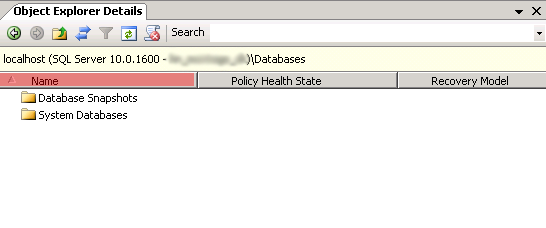
Następnie ponownie zaznacz „Databases”, a odświeżenie listy pokaże bazy danych na serwerze.
Artykuły z kategorii pomocy technicznej: Microsoft SQL Server
